


Rushly: Meet & Date
4.61.62K Reviews
App Specs
- Version
- 1.2.7
- Updated On
- License
- Free
- Downloads
- 100,000+
- Developer
- NICE DAY TECHNOLOGY LIMITED
- Categories
- Social
- Platform
- Android
Screenshots

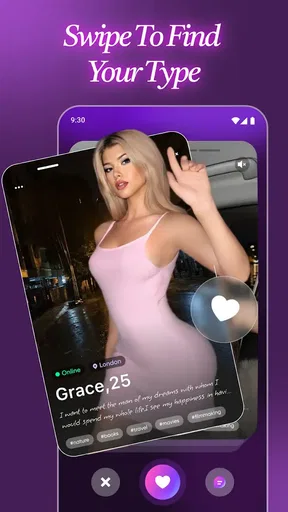

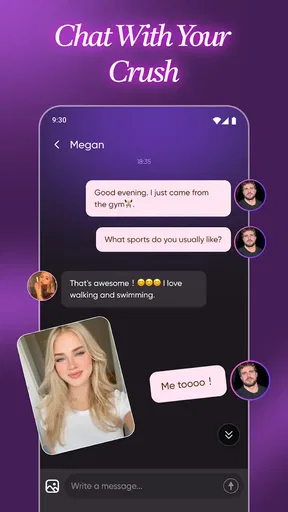
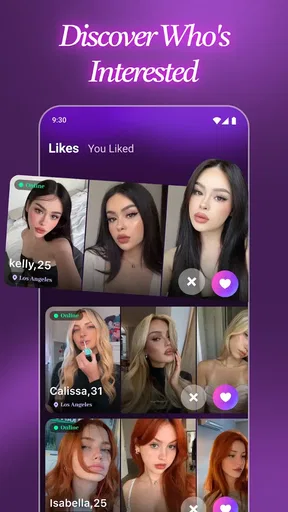


 Analysis by AppCompare
I approached Rushly: Meet & Date as a social app for adults who want to meet people, start conversations, and possibly find a date without treating the experience like a formal matchmaking service. Its basic promise is easy to understand, but the more important question is how well it fits into real life, especially when a phone or tablet is used by more than one person at home. My experience suggests that Rushly is best treated as a personal app with clear account boundaries, not as something to casually leave open on a shared device.
The app is free to install, and its social category tells you more about its purpose than the brief store wording does: this is built around connecting with people rather than managing an existing circle of friends. NICE DAY TECHNOLOGY LIMITED is the developer, and the app has reached a 4.5 average from around 20K ratings, with over 100K installs. Those figures suggest that Rushly has attracted meaningful attention, although they should not replace your own judgement about privacy, conversation quality, and whether its style suits you.
How Rushly fits into everyday shared-device life
A realistic household example would be someone using a family tablet in the evening to browse profiles or reply to messages while other people are nearby. That arrangement can be convenient, but it also creates an immediate boundary: dating conversations are personal. A notification, open profile, or visible chat can reveal more than the user intended. I would use Rushly on my own phone whenever possible, and I would avoid leaving the account signed in on a device that children, guests, or a partner regularly use.
This matters because social apps are not like a weather tool or a shared shopping list. A person may be discussing their location, schedule, interests, or feelings with someone they have only recently met. Even harmless conversation can become awkward if another household member picks up the device at the wrong moment. Rushly does not become a household coordination app simply because the phone is shared; the account still represents one person’s identity and social choices.
If several adults in one home want to use the service, I would keep each account tied to its owner’s device or, at minimum, make sure one person fully signs out before another uses the same hardware. I would not switch between accounts casually, because it is easy to reply from the wrong profile or expose the wrong conversation. A simple routine helps: finish the chat, close the app, check the active account, and only then hand over the device.
That may sound obvious, but dating apps encourage quick actions. A message can be sent in a few seconds, and a profile decision can feel low-risk when you are scrolling quickly. On a shared device, that speed becomes a liability. My practical advice is to slow down whenever the app is being used around other people, particularly before sending photos, sharing contact details, or agreeing to meet.
Setting personal boundaries before the first conversation
The first useful step is deciding what you are comfortable revealing. I would prepare a short, honest introduction that says enough to begin a conversation without giving away a workplace, home address, daily route, or other identifying details. Rushly is more enjoyable when the profile reflects a real personality, but openness should be gradual. A friendly tone does not require a complete personal history.
Worth Reading Before You Choose

EA SPORTS FC Mobile 26 Is a Bigger Football Game, but It Takes Time

Flipboard Shows What News Apps Must Do Beyond the Feed

Switching to Android Auto Means Rethinking Your Driving Routine

Google Calendar Makes a Crowded Week Easier to Manage

Ludo King Makes the Most of the Minutes Between Plans

Baby Panda World Brings Quick Play to Modern Phones, but Its Game Library Feels Busy
I also recommend separating browsing from commitment. Looking through possible connections is one activity; moving a conversation to another service or arranging an in-person meeting is another. Keeping those stages distinct makes it easier to notice pressure. If someone pushes for private information immediately, treats a refusal as a problem, or tries to rush the conversation away from the app, I would take that as a reason to stop rather than a challenge to overcome.
For households, the same principle applies to account ownership. One person should not create or maintain a profile for another person, even if the intention is to help. The profile should reflect the actual user’s choices, age, interests, and boundaries. Shared devices can support access, but they should not blur who is speaking or who is responsible for a conversation.
Rushly is free to download, but it includes in-app purchases ranging from $3.99 to $99.99 per item. That makes a spending boundary worthwhile before using it regularly. I would decide in advance whether I want to spend anything at all, and if a device is shared, I would be especially careful about payment settings and accidental purchases. A free entry point does not mean every part of the experience has no financial friction.
Using the app for deliberate coordination rather than endless swiping
The strongest way to use Rushly is with a clear purpose. Instead of opening it whenever I am bored, I would set aside a short session to review profiles, answer worthwhile messages, and leave. That approach reduces impulsive decisions and makes it easier to remember who I have spoken with. It also keeps the app from taking over the evening, which is important when the same device is needed for work, school, entertainment, or family communication.
A useful workflow is to separate three questions. First, do I genuinely want to talk to this person? Second, does the conversation feel respectful and balanced? Third, is there enough trust to move toward a meeting? A positive answer to the first question should not automatically lead to the third. Rushly can help begin contact, but it cannot replace the judgement needed to assess someone’s behaviour over time.
When coordinating a possible meeting, I would keep the plan simple and public. Choose a busy location, tell someone I trust where I am going, arrange my own transport, and set a check-in time. I would not depend on a new match to provide a ride or decide the location alone. These habits are useful regardless of how polished a dating app feels, because the app only controls the introduction, not what happens afterward.
For a household with multiple adults, coordination also means agreeing on device etiquette. If one person needs the phone for navigation or an urgent call, the Rushly session should be closed first. If another person is waiting to use the tablet, private conversations should not remain visible. There is no benefit in treating personal messages as communal screen content, and a few seconds of care can prevent an uncomfortable misunderstanding.
Compared with a conventional social network, Rushly feels more focused on meeting and dating than on maintaining a broad public feed. That focus can be useful if I want conversations with a clear romantic or friendship possibility. On the other hand, people who prefer a familiar network of existing contacts may find a general messaging or community app more comfortable. Those alternatives usually offer context through mutual friends, groups, or established profiles, while a dating-oriented service asks me to make decisions with less shared background.
It also differs from a formal matchmaking service in spirit. I would not expect Rushly to remove the uncertainty of meeting strangers or to make compatibility obvious. Its value is in opening a door to conversation, not in guaranteeing a suitable relationship. That distinction affects how much time I would invest: enough to explore genuine connections, but not so much that every match becomes an emotional project.
Age, trust, and the limits of a shared account
Rushly carries a Mature 17+ content rating, so I would treat age as a firm boundary rather than a suggestion. It is not an app I would hand to a younger teenager for casual browsing, and I would not create an account for someone who does not meet the stated age context. In a family home, adults should make sure younger users understand that the app is not intended for them, while also remembering that a shared device can make accidental access easier.
The age rating does not mean every person on the service is trustworthy, nor does it make a conversation safe by itself. I would still avoid assuming that a profile tells the whole story. Trust should come from consistent, respectful behaviour, not from attractive photos, confident messages, or a willingness to move quickly. If a conversation becomes manipulative, sexual in an unwanted way, threatening, or financially demanding, ending contact is more important than preserving politeness.
I would be equally cautious with photos. A picture can identify a home, school, workplace, or regular routine through its background. Before sharing anything, I would check what is visible behind me and whether the image says more than I intend. On a shared device, I would also consider whether private images might appear in a gallery or notification preview where someone else can see them.
The same care applies to personal details in ordinary messages. A first name may be comfortable; a full address, employer, travel plan, or financial information may not be. I would avoid sending documents, payment details, or verification codes to a new contact. If someone claims to need money to solve an emergency or promises a reward for quick action, I would stop engaging and use the app’s available safety tools if appropriate.
One of the less obvious trade-offs is that convenience can encourage oversharing. A person may feel more relaxed while sitting at home, especially when chatting late at night, and reveal details they would not share face to face. I find it useful to reread a message before sending it and ask whether I would be comfortable if it were shown to a trusted friend. That small pause is particularly valuable when the device is shared or the conversation feels emotionally intense.
What the current version means for day-to-day use
The current version is 1.2.7, and the app supports devices running Android 6.0 or later. That broad operating-system requirement makes Rushly accessible to people who are not using a recent phone, although the actual experience will still depend on the device’s screen, speed, battery condition, and notification behaviour. On an older shared tablet, I would pay attention to whether the app remains responsive before relying on it for an arranged meeting.
I would also keep the operating system and the app updated when updates are available through the normal store process. That is not a promise that every problem disappears, but it is a sensible way to avoid preventable compatibility issues. If the app is used on a device that belongs to someone else, the owner should be involved in account and payment decisions rather than discovering them afterward.
Notifications deserve a deliberate setup. A message preview on a lock screen may be useful when the phone belongs to one person, but it can be too revealing on a family tablet or a device left on a desk. I would choose a notification style that protects the conversation from casual viewing. I would also remember that deleting a notification does not necessarily erase the conversation itself, so the account should be handled as private from the beginning.
Another practical tip is to keep a small personal record of important context outside the app, without copying sensitive information unnecessarily. If I am speaking with several people, I might note only a first name or a broad interest so I do not confuse conversations. I would never store passwords, payment information, or intimate material in an unprotected household note. The goal is to reduce confusion, not create a second privacy problem.
Who will enjoy Rushly, and who should choose another route?
I think Rushly suits adults who want a straightforward place to meet people and are willing to take responsibility for the pace of each interaction. It is particularly appealing to someone who prefers a focused dating environment over a general social feed. The free entry point makes it easy to try, while the social format leaves room for both friendship and dating intentions, provided those intentions are communicated honestly.
I would be more cautious about recommending it to someone who dislikes uncertainty, becomes discouraged by slow replies, or expects an app to filter out every unsuitable person. It is also a poor fit for anyone looking for a private household communication tool, a supervised youth experience, or a service where family members can share one profile. The Mature 17+ context alone makes it inappropriate for younger users, even if the app is installed on a family device.
People who mainly want to reconnect with known friends may be better served by a messaging platform or an established social network. People who want a highly structured compatibility process may prefer a service built around detailed questionnaires and longer profiles. Rushly makes more sense when the appeal is discovery and conversation, not when the user wants certainty before speaking to anyone.
There is also a financial judgement to make. Although I can begin without paying, the available purchase range means I would avoid spending simply because a conversation feels promising. I would first decide whether the app is producing respectful, worthwhile interactions. If the experience becomes dependent on repeated purchases or creates pressure to pay for attention, I would step back rather than treating spending as part of the dating process.
My household verdict after using it as a personal social app
Rushly: Meet & Date is a reasonable option for adults who want to explore new connections in a focused social app, but it works best with a calm, private, and deliberate routine. I like the clear purpose and the low barrier to trying it, yet I would not confuse convenience with safety or assume that a good first impression proves compatibility. The app can start a conversation; the user still has to decide whether that conversation deserves time and trust.
In a household, my recommendation is simple: treat the account as personal, keep it away from casual shared use, protect notification previews, and agree on spending before anyone taps a purchase button. If several adults use one device, careful sign-out habits are essential. If a younger person might access the device, the 17+ rating should settle the question before installation.
My final view is positive but measured. I would recommend Rushly to an adult friend who wants to meet people and understands that dating apps require boundaries, patience, and common sense. I would not recommend it as a family-shared app, a replacement for trusted social circles, or a shortcut to guaranteed compatibility. Used privately and thoughtfully, it can be a useful starting point; used casually on a communal screen or with rushed expectations, it creates more friction than it solves.
Pros
- Quick sign-up makes it easy to start browsing profiles.
- Location-based matching can help you meet people nearby.
- Clean interface keeps profile discovery simple.
- Chat features make it easy to continue conversations in-app.
- Useful for casual dating and expanding your local social circle.
Cons
- The quality of matches may vary greatly by location.
- Some features may require a paid subscription or in-app purchases.
- Profiles with limited information can make intentions unclear.
- You may encounter inactive accounts or delayed replies.
- Sharing location and personal details requires careful privacy settings.
FAQs for Rushly: Meet & Date
What is Rushly: Meet & Date, and how does it work?
Rushly: Meet & Date is a dating and social discovery app designed to help users meet people, browse potential matches, and start conversations. After creating a profile, you can usually add photos and personal details, set preferences, and explore other users. Matching and messaging features may depend on mutual interest, account settings, or the app’s available free and premium options.
Is Rushly: Meet & Date free to download and use?
Rushly: Meet & Date may be available to download at no initial cost, but some features can require in-app purchases or a subscription. Basic profile creation and browsing may be accessible for free, while options such as unlimited messaging, advanced filters, visibility boosts, or seeing additional interactions could be restricted. Check the current store listing and subscription terms before confirming any payment.
How can I protect my privacy and stay safe while using Rushly?
When using Rushly: Meet & Date, avoid sharing sensitive information such as your home address, financial details, passwords, or copies of personal documents. Keep early conversations inside the app, be cautious of users requesting money, and arrange first meetings in busy public places. Review the app’s privacy settings, block suspicious profiles, and report inappropriate behavior through the available safety tools.
Does Rushly: Meet & Date require my location or personal information?
Dating apps commonly request information such as an email address, age, photos, interests, and approximate location to create profiles and suggest nearby users. Rushly: Meet & Date may also request device permissions depending on the features you use. Before accepting access, review each permission carefully and disable anything unnecessary. Also read the privacy policy to understand how profile and location data may be handled.
What should I do if I experience a problem with my Rushly account?
If you cannot log in, your profile is not working correctly, or you encounter harassment, begin by checking the app’s help, support, or account settings section. Update the application and verify your internet connection before trying again. For suspicious activity, change your password and report the account. If you purchased a subscription, keep payment confirmations available when contacting support about billing or cancellation issues.


